How Accuvio Flow works
A walkthrough of Accuvio Flow from data connection to cash flow answer.
Get your data in
Connect Xero (recommended)
Authorise once. Accuvio Flow syncs your bank balances, transactions, bills, invoices, and chart of accounts from Xero each day so the forecast stays current. Read-only by default. Nothing in Xero can be changed from Accuvio Flow.

Set up manually
No Xero? Add your bank balances, recurring income and costs, employees, and any planned bills or invoices directly in Accuvio Flow. The forecast works the same way, you just keep it current by hand instead of by automatic sync.


Map your accounts or add your categories
If you connected Xero, Accuvio Flow auto-maps most of your chart of accounts and you confirm the rest. If you're setting up manually, add your income and cost categories directly. Either way, mapping decides how each transaction rolls up into the forecast, so a clean mapping means a clean forecast.
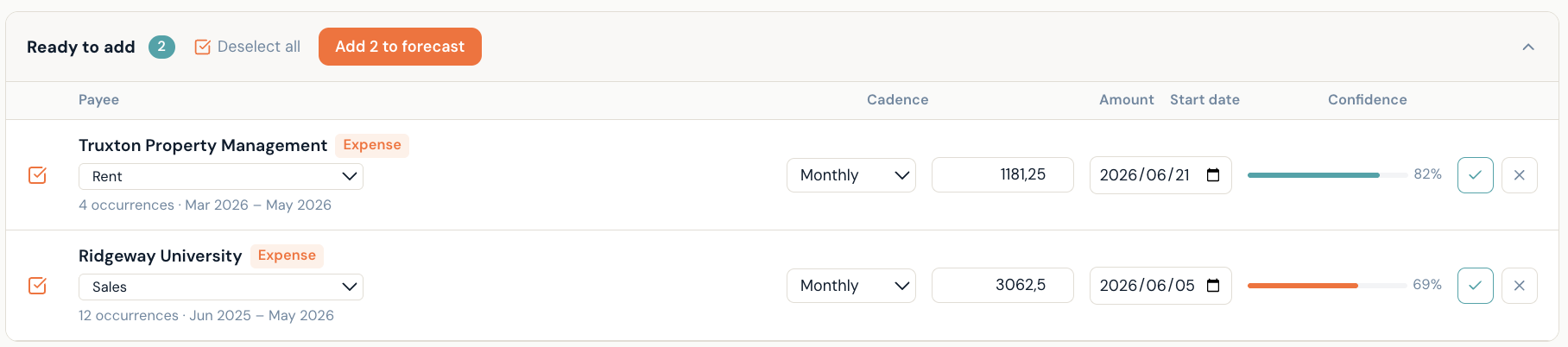
Spot recurring patterns. Add them in one click.
Once your accounts are mapped, Accuvio Flow scans your Xero transaction history and surfaces recurring patterns — monthly supplier payments, quarterly licences, regular inflows. Each pattern comes with a confidence score so you can see exactly what the data supports.
Approve a pattern and it becomes a recurring transaction in your forecast from that point forward. Dismiss it and it won't surface again. No manual entry, no guesswork.
Add your people
Employees drive a big chunk of cash flow. Add salaries, countries, and start dates. PAYE and UIF are estimated automatically for South African employees, NI and PAYE for UK employees. Planned hires sit alongside current employees so the forecast picks them up from their start date.


See your eighteen months
Six months of actuals on the left. Twelve months forward on the right. The today line is unmistakable. Switch granularity between day, week, month, and quarter. Switch chart style between line, bars, or stacked.
See the impact before you commit
Thinking about a hire, a deferred supplier payment, or chasing an overdue invoice? Use the levers in Insights to model the impact on your forecast in real time. Apply the changes when you decide. Discard them when you don't. No spreadsheets.

Ready to see it for your business?
14-day free trial. No credit card. Cancel anytime.
Start free for 14 days